






MGR University BSc Nursing Result 2026 Out for 3rd Semester, Download Link Active @tnmgrmu.ac.in
MGR University BSc Nursing Result 2026 Out for 3rd Semester has been officially declared by the Tamil Nadu Dr. M.G.R. Medical University for various semester and annual examinations. Students can check their semester marksheets online by entering their registration number on the official exam portal. Candidates dissatisfied with their marks can also apply for re-totalling or revaluation within the prescribed timeline.



MGR University BSc Nursing Result 2026: The Tamil Nadu Dr. M.G.R. Medical University has officially released the MGR University BSc Nursing Result 2026 for undergraduate nursing students across affiliated colleges in Tamil Nadu on 30 July, 2026. Candidates who appeared for the semester and annual nursing examinations can now view their provisional marksheets online through the official examination portals. The university conducts examinations for various semesters of the Four-Year Bachelor of Science in Nursing and Post Basic BSc Nursing programs throughout the academic year.
Students need their registration number and date of birth to check their qualifying status, subject-wise marks, and grade details on the portal.
MGR University BSc Nursing Result 2026 Out for 3rd Semester
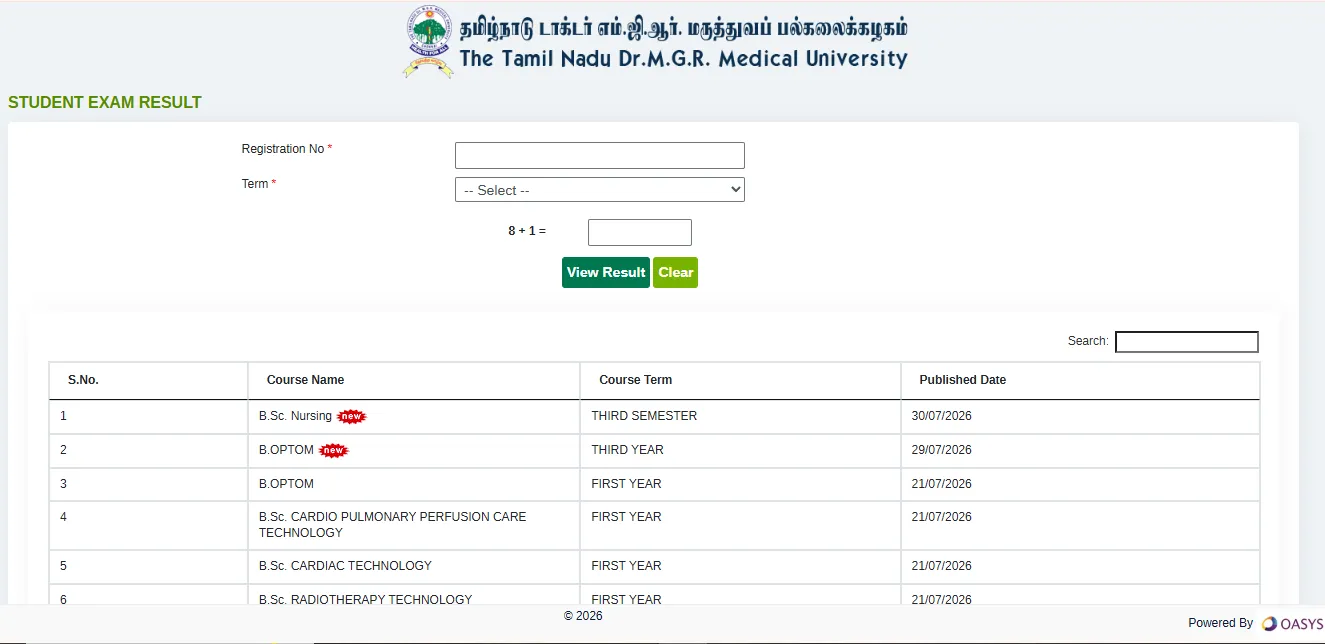
Tamil Nadu Dr M.G.R. Medical University (TNMGRMU) has released the results of BSc Nursing 3rd Semester on its official website on 30 July, 2026. Students who appeared for this examination can check and download their results directly from the official examination portal, using their registration number.
MGR University BSc Nursing Result 2026 Overview
The Tamil Nadu Dr. M.G.R. Medical University (TNMGRMU) publishes undergraduate and postgraduate nursing exam results on its online results portal. Below is a quick overview of the examination details:
| MGR University BSc Nursing Result 2026 Overview | |
| Particulars | Details |
| University Name | The Tamil Nadu Dr. M.G.R. Medical University (TNMGRMU) |
| Course Offered | Bachelor of Science in Nursing (B.Sc Nursing / Post Basic B.Sc Nursing) |
| Academic Session | 2025–2026 |
| Exam Mode | Offline (Pen and Paper Written Test) |
| Result Status | Declared (Released Phase-wise for Semesters) |
| Result Date | 30 July, 2026 |
| Credentials Required | Register Number & Date of Birth |
| Official Website | tnmgrmu.ac.in |
| Result Verification Portal | cms2results.tnmgrmuexam.ac.in/#/ExamResult |
TN MGR University BSc Nursing Result 2026 Direct Link
Students can check their semester results through two official portals maintained by the university. Candidates should keep their registration details handy before opening the result link.
How to Check MGR University BSc Nursing Result 2026 Online
Follow these step-by-step instructions to check and download your provisional nursing marksheet from the examination server:
1. Visit the Official Portal:
Open your web browser and go to the official portal at cms2results.tnmgrmuexam.ac.in/#/ExamResult or navigate to the "Results" tab on tnmgrmu.ac.in.
2. Select Your Course Stream:
Locate the list of recently declared results and click on the link titled "B.Sc Nursing / Post Basic B.Sc Nursing Result 2026".
3. Enter Login Credentials:
Enter your official Register Number into the login text box. Select your course term or semester if prompted.
4. View and Download Marksheet:
Click the "View Result" or "Submit" button. Your provisional statement of marks will be displayed on the screen. Print or save a copy for reference.
Details Mentioned on TNMGRMU BSc Nursing Marksheet 2026
After downloading the statement of marks, candidates must carefully verify all printed details. In case of any spelling errors or incorrect marks, report the issue to your college examination department:
-
Candidate’s Full Name
-
Registration Number / Roll Number
-
College / Institution Name & Code
-
Course & Semester Details (e.g., B.Sc Nursing 2nd / 4th / 6th / 8th Semester)
-
Subject-Wise Theory & Practical Marks
-
Internal Assessment Scores
-
Total Obtained Marks vs Maximum Marks
-
Qualifying Status (Pass / Fail / Withheld)
MGR University BSc Nursing Revaluation & Re-totalling Process
Candidates who are not satisfied with their marks or who failed in a particular subject can apply for mark re-totalling or answer script verification:
-
Submission Window: The university opens the online re-totalling application window within 7 to 10 days after the result declaration.
-
Application Fee: A non-refundable processing fee per paper must be paid through the official college office or online portal.
-
Process: During re-totalling, the university re-checks whether all answers were evaluated correctly and whether total marks were calculated without errors.
-
Final Result: Updated marks after re-totalling are published on the official web portal, and revised marksheets are sent to the respective colleges.
Problems in downloading the MGR University Result 2026
If any candidate faces any issues in downloading the MGR University result 2026. He/She must do the following things before connecting with the exam conducting authority.
-
Close your Internet browser and try again.
-
Ensure you have a stable internet connection.
-
Use Mozilla Firefox and Google Chrome browsers to download the admit card.
-
Clear the history and cache and refresh the page.
Explore the BSc Nursing Online Coaching to access essential resources for Nursing exam preparation, including detailed insights and strategies. Dive into the Nursing 2026 for structured courses and focused study plans designed to help aspirants excel in their exams.
MGR University BSc Nursing Result 2026 FAQs
What credentials are required to check the MGR University BSc Nursing Result 2026?
What is the official website for TN MGR Medical University results?
What should I do if my result shows "Withheld"?
Is the online result copy valid as an official marksheet?





Get Free Counselling Today
and Clear up all your Doubts
 Live & recorded classes available at easeDashboard for progress trackingLakhs of practice questions

