








PGIMER BSc Nursing Admit Card 2026 Out @pgimer.edu.in, Download Hall Ticket Link Active
PGIMER BSc Nursing Admit Card 2026 is officially out. Visit pgimer.edu.in to download your entrance exam hall ticket, check roll number & test center. Learn the steps to download the PGIMER BSc Nursing Hall ticket 2026, including potential issues and fixes.

The Postgraduate Institute of Medical Education and Research (PGIMER), Chandigarh has officially issued the hall tickets for its upcoming BSc nursing entrance exam. Candidates appearing for the 4-Year BSc Nursing program (exclusively for female applicants) and the 2-Year BSc Nursing Post-Basic course (co-educational) can now access their credentials online. The entrance test is organized as a Computer-Based Test (CBT) scheduled across various test cities on July 24, 2026.
PGIMER BSc Nursing 2026 Admit Card Released
PGIMER, Chandigarh has released the PGIMER BSc Nursing 2026 Admit Card on its official website on 15 July, 2026. Candidates appearing for the B.Sc. Nursing (4 Years) entrance examination scheduled for 24 July 2026 can now download their hall tickets by logging in with their registered user ID and password.
The admit card contains important details such as the candidate's name, roll number, exam date, reporting time, examination centre, and exam-day instructions. Candidates must carry a printed copy of the admit card along with a valid photo ID to the examination centre for verification.
PGIMER BSc Nursing 2026 Admit Card Overview
Before diving into the download steps, let us take a glance at the core scheduling details and exam architecture managed by PGI Chandigarh:
|
PGIMER BSc Nursing 2026 Admit Card Overview |
|
|
Exam Particulars |
Details |
|
Exam Authority |
Postgraduate Institute of Medical Education and Research (PGIMER), Chandigarh |
|
Current Status |
PGIMER BSc Nursing Admit Card 2026 Out (Released July 15, 2026) |
|
Official Exam Date |
July 24, 2026 (Friday) |
|
Mode of Examination |
Online Computer-Based Test (CBT) |
|
Test Duration |
90 Minutes (1.5 Hours) |
|
Question Breakdown |
100 Multiple Choice Questions (MCQs) |
|
Marking Matrix |
+1 for a correct answer; -0.25 negative marking for errors |
|
Official Portals |
pgimer.edu.in / cdn.digialm.com gateway |
PGIMER BSc Nursing 2026 Admit Card Download Link
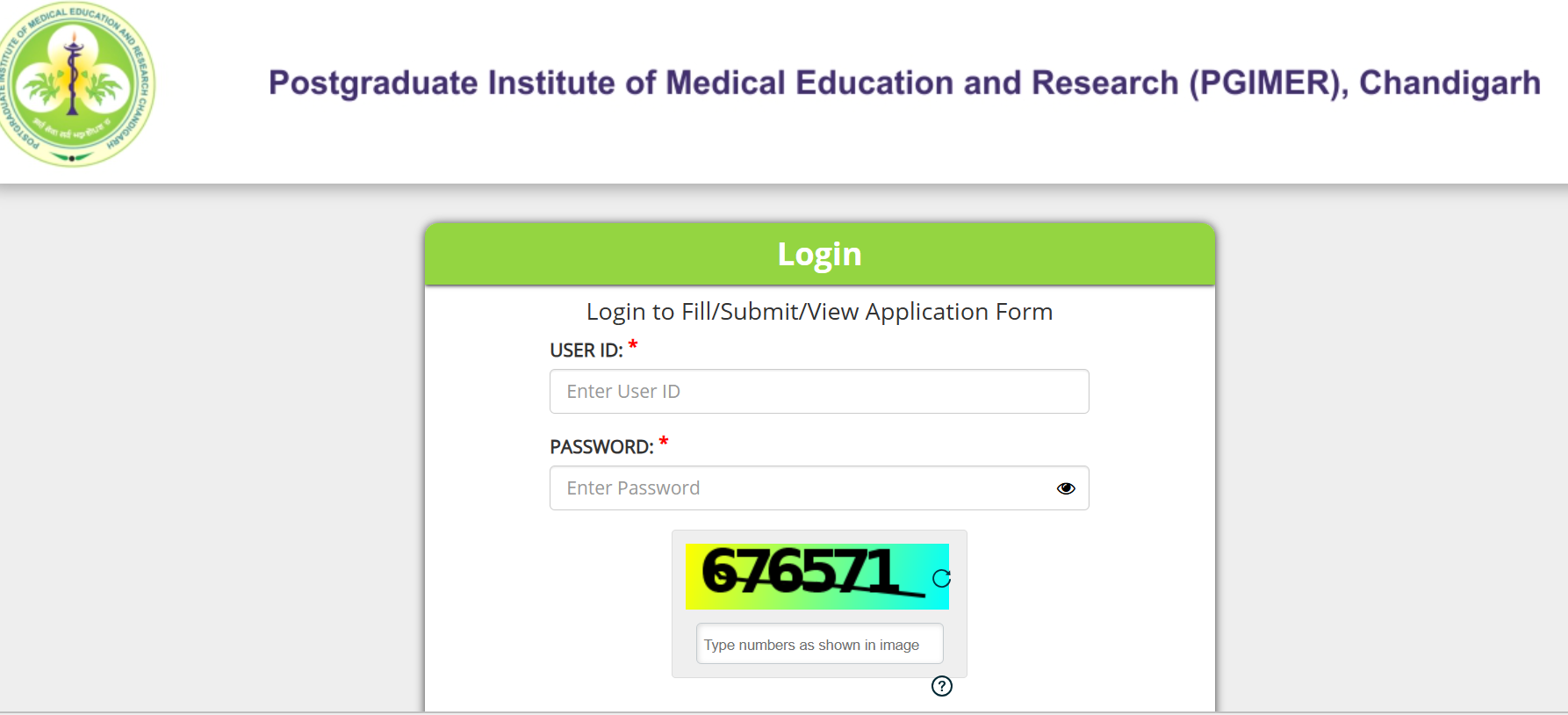
Candidates appearing for the B.Sc. Nursing (4 Years) Entrance Examination 2026 can download their hall ticket by logging in with their User ID and Password. The admit card was released on 15 July 2026, while the entrance examination is scheduled for 24 July 2026. Candidates can download the admit card using the direct link provided here.
How to Download PGIMER BSc Nursing 2026 Hall Ticket
The institute hosts its entrance exam portal on a secure TCS iON Digialm server link to ensure smooth traffic. Follow these step-by-step instructions to get your download without any errors:
1.Visit the Official Portal:
Open your web browser and go directly to the PGIMER Chandigarh home page at pgimer.edu.in.
2.Locate the Admission Track
Click on the prominent notification banner reading "Admit Card for Entrance Test of B.Sc. Nursing (4 Years) and (Post Basic) to be held on 24.07.2026".
3.Provide User Account Credentials
The link will launch a secure login box. Type in your unique User ID / Application Login ID and the Password created during your June registration window.
4.Solve Captcha Verification
Type the alphanumeric security code visible in the box accurately and click on the Login button.
5.Download and Save
Once inside your student dashboard tab, click on the 'Admit Card' download option. Save the document securely as a PDF on your device and print two clear, colored copies on standard A4 paper sheets.
Login Credentials Required To Download PGIMER BSc Nursing Admit Card 2026
Candidates need the following login credentials to download the PGIMER BSc Nursing Admit Card 2026 from the official admission portal:
- User ID
- Password
After entering these credentials, candidates can log in to the PGIMER portal to access and download their admit card.
Details to Verify on Your Digital PGIMER BSc Nursing 2026 Call Letter
As soon as the file opens on your screen, double-check all printed information. If there are typos, blurred images, or incorrect details, contact the PGIMER training branch immediately for corrections.
-
Personal Identification: Full candidate name (matching your Class 12 passing certificate), date of birth, category designation (UR, OBC, SC, ST, EWS), and father's name.
-
Visual Assets: Ensure your uploaded passport-sized photograph and scanned signature are sharp and easily readable.
-
Assigned Venue Specifics: Check the complete address of your designated online test center, your reporting time, and the center gate closure schedule.
-
Roll Number Allocation: Your unique exam roll number and application reference code required for the computer terminal login.
Correction Alert: In case of discrepancies regarding your photo layout or category details, immediately email the PGIMER admission helpdesk along with your application form copy to prevent verification issues on exam day.
Items to Carry to the PGIMER BSc NursingTest Center
To complete the biometric verification protocols smoothly at the test center entrance, make sure to bring these mandatory documents:
-
Printed Hard Copy: A clean, colored printout of your downloaded hall ticket (digital copies on mobile phones are strictly prohibited).
-
Original Government Identification: A valid, original photo ID proof such as an Aadhaar Card, PAN Card, Voter ID, or Indian Passport. E-Aadhaar is acceptable only if the print is crisp and scannable.
-
Passport Photos: Two identical, colored passport-size photographs matching the one uploaded on your application form.
-
Category Validation: Caste or PwBD certificates, if applicable, for verification processes.
PGIMER BSc Nursing 2026 Exam Day Guidelines and Dress Code
To ensure fair testing, PGIMER Chandigarh enforces strict rules at all evaluation centers:
-
Reporting Time: Arrive at your test center at least 60 to 90 minutes before the test begins. Gate closures are strictly enforced, and late arrivals will not be allowed inside.
-
Banned Tech & Accessories: Smartwatches, mobile phones, calculators, bluetooth earpieces, charms, wallets, and textbooks are strictly forbidden. No storage counters are guaranteed at the test center.
-
Dress Code Protocols: Candidates should wear simple, casual clothes without large buttons, layers, or deep pockets. Avoid heavy metallic jewelry, thick-soled shoes, and elaborate hair clips to speed up metal detector screenings.
PGIMER BSc Nursing 2026 Admit Card Downloading Issues & Fixes
Candidates may occasionally face technical or login-related issues while downloading the PGIMER BSc Nursing 2026 Admit Card. Most problems can be resolved by following a few simple steps. The admit card is available only through the official PGIMER admission portal using the registered login credentials.
| Issue | Possible Fix |
|---|---|
| Invalid User ID or Password | Re-enter the correct login credentials and check for typing errors or unnecessary spaces. |
| Forgot Password | Use the "Forgot Password" option on the login page to reset your password. |
| Website Not Loading | Refresh the page, clear your browser cache, or try accessing the portal during non-peak hours. |
| Slow Website Response | Wait for a few minutes and try again, as heavy traffic may temporarily slow down the website. |
| Admit Card Not Displaying | Ensure your application was successfully submitted and use an updated browser such as Chrome, Edge, or Firefox. |
| Download/PDF Not Opening | Download the file again and open it using a PDF reader like Adobe Acrobat Reader. |
| Incorrect Details on Admit Card | Immediately contact the PGIMER admission authorities for correction before the examination. |
| Browser Compatibility Issues | Switch to another browser or use a desktop/laptop instead of a mobile device for downloading. |
PGIMER BSc Nursing Exam Date 2026
The entrance test is on July 24, 2026. Make sure to download your document early via pgimer.edu.in to avoid last-minute server delays. Double-check your assigned center details, keep your original photo ID handy, and dedicate these remaining days to revising your Class 11 and 12 science topics.
PGIMER BSc Nursing Admit Card 2026 FAQs
How can I download the PGIMER BSc Nursing Admit Card if it is officially out?
What is the official exam date for the PGIMER BSc Nursing 2026 entrance test?
Will I receive a physical copy of my PGI Chandigarh nursing hall ticket via post?
What should I do if I forget my login password for the PGIMER website?


Have questions about your prep?
Our experts can answer all your questions

 Live & recorded classes available at easeDashboard for progress trackingLakhs of practice questions

