







How to Download CBSE Class 10 Second Board Result 2026: Check Scorecard via DigiLocker, CBSE Result Portal & UMANG



How to Download CBSE Class 10 Second Board Result 2026: The Central Board of Secondary Education (CBSE) has announced the Class 10 Second Board Result 2026. Students who appeared for the Second Board Examination (Phase 2) can now download their scorecards through multiple official platforms, including DigiLocker, the CBSE Result Portal, and the UMANG App.
To make the result-checking process easier, CBSE has provided several official websites and digital platforms so that students can access their marksheets even if one website experiences heavy traffic.
This guide explains where to check the result, how to download the scorecard, required login credentials, and what to do if the website is not responding.
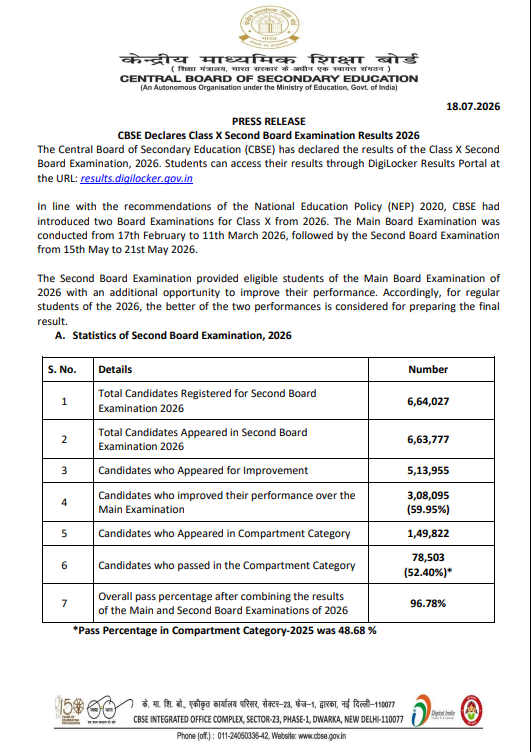
Where to Download CBSE Class 10 Second Board Result 2026?
Students can access their CBSE Class 10 Second Board Result 2026 through the following official platforms:
1. DigiLocker (Recommended)
The easiest way to download the digital marksheet is through DigiLocker.
Website:
https://results.digilocker.gov.in
Students can also use the DigiLocker mobile application.
2. CBSE Result Portal
CBSE publishes the result on its dedicated result website.
Official Portal:
https://results.cbse.nic.in
3. CBSE Official Website
Students can also visit the board's official website for the latest result notification.
Website:
https://cbse.gov.in
4. CBSE Results Website
Another official result portal is:
5. UMANG App
Students may also check their results using the Government of India's UMANG App.
6. Parinam Manjusha
CBSE also stores verified digital academic records on the Parinam Manjusha repository, allowing students to access authenticated marksheets in the future.
7. SMS & IVRS
If the websites are slow due to heavy traffic, students can use the SMS and IVRS services (if activated by CBSE) to obtain their results.
How to Download CBSE Class 10 Second Board Result 2026 from DigiLocker?
Follow these simple steps:
-
Visit results.digilocker.gov.in.
-
Log in using your registered mobile number or DigiLocker credentials.
-
Enter the required security PIN or access code (if prompted).
-
Open the CBSE Class 10 Second Board Result 2026 section.
-
Enter your Roll Number and other required details.
-
Click Submit.
-
Download and save your digital marksheet.
How to Download CBSE Class 10 Second Board Result 2026 from the CBSE Result Portal?
Students can also download the result directly from the official CBSE result website.
Steps to Check Result
-
Visit results.cbse.nic.in.
-
Click on CBSE Class 10 Second Board Result 2026.
-
Enter your:
-
Roll Number
-
School Number
-
Admit Card ID
-
Date of Birth (if required)
-
Click on Submit.
-
Your scorecard will appear on the screen.
-
Download and print it for future use.
How to Check CBSE Class 10 Second Board Result 2026 on UMANG?
Students preferring the UMANG application can follow these steps:
-
Download or open the UMANG App.
-
Log in with your registered mobile number.
-
Search for CBSE Services.
-
Select Class 10 Second Board Result 2026.
-
Enter your Roll Number and Date of Birth.
-
Submit the details.
-
Download your result.
Login Credentials Required
Students should keep the following details ready before checking their result:
-
Roll Number
-
School Number
-
Admit Card ID
-
Date of Birth
-
DigiLocker Access Code (if applicable)
Details Mentioned on the CBSE Class 10 Second Board Scorecard
After downloading the marksheet, students should verify the following information:
-
Student's Name
-
Roll Number
-
School Name
-
Father's Name
-
Mother's Name
-
Subject-wise Marks
-
Grades
-
Overall Result Status
-
Final Percentage
-
Passing Status
If any discrepancy is found, students should immediately contact their school or CBSE regional office.
Forgot Your DigiLocker Access Code?
Many students receive a 6-digit DigiLocker Access Code (Security PIN) from their schools.
If you haven't received it:
-
Contact your school immediately.
-
Ensure your mobile number is correctly registered.
-
Log in using your existing DigiLocker account if already activated.
What If the CBSE Result Website Is Not Working?
Since lakhs of students check their results simultaneously, the official portals may become slow.
If you're unable to access your result:
-
Wait for a few minutes and try again.
-
Refresh the page.
-
Use another official website.
-
Switch to DigiLocker or UMANG.
-
Clear your browser cache.
-
Use a stable internet connection.
Avoid checking results on unofficial websites.
Which Platform Is Best for Downloading the Result?
Among all available options, DigiLocker is generally the fastest and most reliable platform because CBSE directly uploads digitally verified marksheets there. Students can also access these documents later for admissions and official verification.
How to Download CBSE Class 10 Second Board Result 2026 FAQS
Where can I download the CBSE Class 10 Second Board Result 2026?
Which login credentials are required to check the result?
Can I download the CBSE Class 10 marksheet from DigiLocker?





Get Free Counselling Today
and Clear up all your Doubts
 Live & recorded classes available at easeDashboard for progress trackingLakhs of practice questions

