







How to download SSC CGL 2026 City Intimation Tier 1, Check Steps to Download
How to download the SSC CGL 2026 Tier 1 city intimation slip is discussed here. The computer-based test will take place between 30.09.2026 and 30.10.2026. Registered candidates can check their exam city intimation slip through candidate login on the official portal.

Staff Selection Commission (SSC) has issued an official notification regarding the Combined Graduate Level Examination 2026 (Tier-I). The nationwide computer-based examination will be administered from 30.09.2026 to 30.10.2026. Aspirants preparing for this recruitment must understand how to download SSC CGL 2026 city intimation tier 1 slips to verify their test locations in advance.
The Computer-Based Examination (CBT) for SSC CGL Tier 1 is scheduled to take place from September 30 to October 30, 2026, across designated examination centres in India.
SSC CGL City Intimation Slip 2026 Out
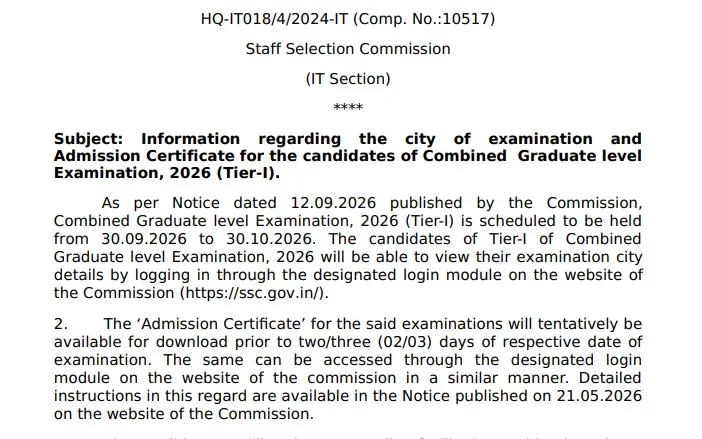
The Staff Selection Commission released the SSC CGL City Intimation Slip 2026 on its official website on 21st September 2026. It marks the final countdown for Tier 1 preparation. Check your exam date and city status on ssc.gov.in immediately to make all necessary travel and accommodation arrangements. Keep your login credentials ready to download the official admit card starting September 27, 2026. Check the official notice below:
SSC CGL City Intimation Slip 2026 Official Notice PDF
SSC CGL City Intimation Slip 2026 Overview
The release of the SSC CGL City Intimation Slip 2026 helps candidates plan travel and accommodation well before their test date. This recruitment drive aims to fill 12,256 Group 'B' and Group 'C' vacancies across central government ministries and departments.
| SSC CGL City Intimation Slip 2026 Highlights | |
| Feature | Details |
| Recruiting Authority | Staff Selection Commission (SSC) |
| Exam Name | Combined Graduate Level Examination, 2026 (Tier 1) |
| Total Vacancies | 12,256 Posts |
| City Intimation Release Date | September 21, 2026 |
| Tier 1 Exam Dates | September 30 to October 30, 2026 |
| Admit Card Release Date | September 27, 2026 (Expected) |
| Official Portal | ssc.gov.in |
How to Download SSC CGL 2026 City Intimation Tier 1 Slip
Follow these steps to check your allotted examination city and shift details:
-
Visit the official website of the Staff Selection Commission at ssc.gov.in.
-
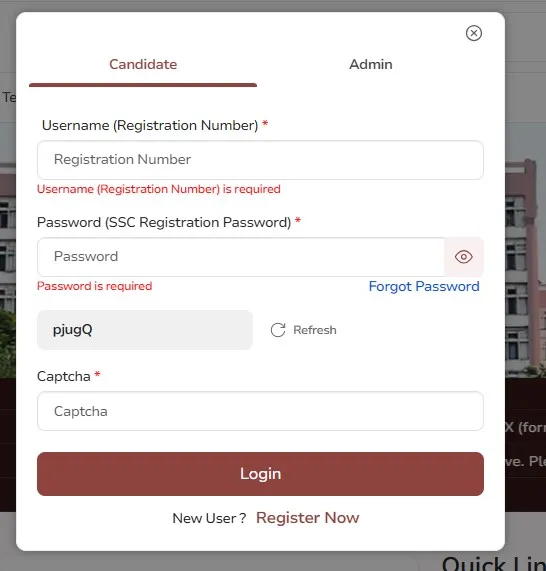
Click on the Candidate Login section on the homepage
-
Enter your Registration Number/Username, Password, and the visible Captcha code.
-
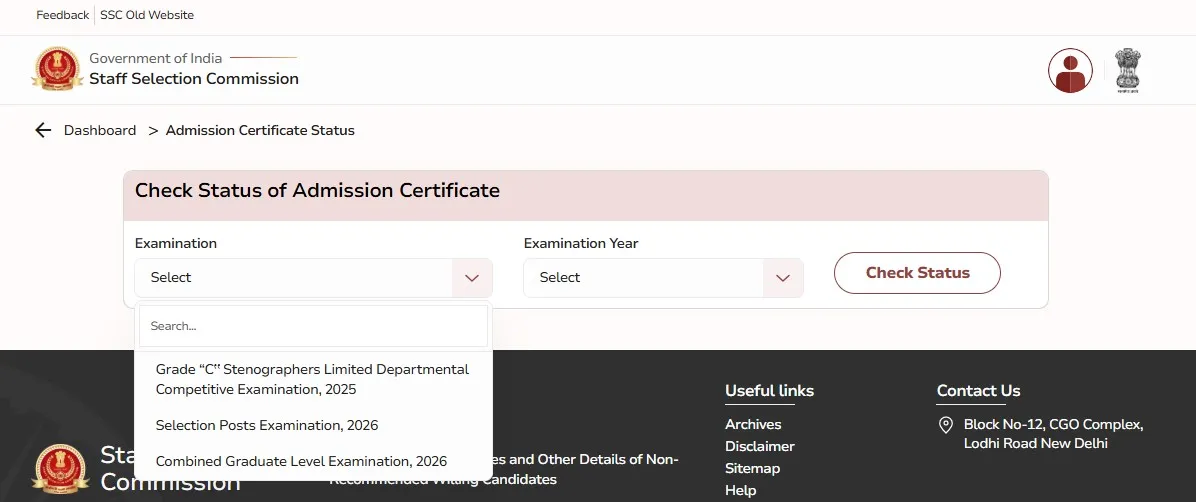
Navigate to the dashboard link for Combined Graduate Level Tier 1 Examination 2026.
-
Click on Check City Intimation Slip to display your exam city, date, and shift.
-
Download and save the slip for your travel planning.
Alternate Methods to Download SSC CGL 2026 City Intimation Tier 1 Slip
If you are unable to access the main login portal on ssc.gov.in due to high server traffic, forgotten passwords, or technical glitches, there are three alternate ways to check or download your SSC CGL Tier 1 City Intimation Slip:
Method 1: Download via SSC Regional Websites (No Password Required for Many Regions)
SSC maintains independent portals for its 9 regional divisions. Many regional portals allow you to view the city intimation status using only your Name and Date of Birth or Roll Number.
-
Go to the regional portal corresponding to the state where you selected your first exam center preference:
-
NR (Northern Region - Delhi, RJ, UK)
-
CR (Central Region - UP, Bihar)
-
SR (Southern Region - AP, TN, Puducherry, Telangana)
-
WR (Western Region - MH, Gujarat, Goa)
-
ER (Eastern Region - WB, Odisha, Jharkhand, A&N Islands)
-
KKR (Karnataka Kerala Region)
-
MPR (MP, Chhattisgarh)
-
NWR (North Western Region - Punjab, Haryana, HP, J&K)
-
NER (North Eastern Region - Assam, Meghalaya, Manipur, etc.)
-
-
Look for the link: "Know Your Status / Exam City for Combined Graduate Level Examination (Tier 1), 2026".
-
Select the "If you do not know Roll / Registration Number" option.
-
Enter your Candidate Name, Father's Name, and Date of Birth (DD/MM/YYYY).
-
Click Search / Submit to display your exam date, shift timing, and assigned city.
Method 2: Recover Account via "Forgot Password / Roll Number"
If you cannot log in to ssc.gov.in because you forgot your login details:
-
Visit ssc.gov.in and click on Forgot Password / Registration Number on the login module.
-
Select your Permanent State and enter your Registered Email ID or Mobile Number.
-
Click Submit to receive an OTP on your mobile or email.
-
Enter the OTP to view your Registration Number on screen and reset your password.
-
Log back into official portal to access your city slip.
Method 3: Search Registered Email Inbox
SSC sends automated confirmation emails containing application credentials and exam status updates:
-
Open the email inbox linked to your SSC account.
-
Search for terms like "SSC CGL 2026", "Staff Selection Commission", or "Registration Number".
-
Locate your registration acknowledgment email to retrieve your Registration ID and verify your regional registration details.
SSC CGL Admit Card 2026 Release Date
SSC CGL Admit Card will be released from 27th September 2026 onwards on the official SSC website. Generally, the admit card will be available 2-3 days before the exam date. Candidates can download it by logging in with their Registration Number and Password. The admit card will contain the exam centre address, exam date, shift timing, reporting time and important exam-day instructions.
PW provides SSC exam content, including SSC Exams Updates, sample papers, mock tests, guidance sessions, and more. Also, enroll today in the SSC Online Batches for preparation.
How to download SSC CGL 2026 City Intimation Tier 1 FAQs
Is the SSC CGL City Intimation Slip 2026 released?
Where can I download the SSC CGL City Intimation Slip 2026?
Is the SSC CGL City Intimation Slip the same as the admit card?
When will the SSC CGL Tier 1 Admit Card 2026 be available?




Get Free Counselling Today
and Clear up all your Doubts
 Live & recorded classes available at easeDashboard for progress trackingLakhs of practice questions

