







SSC MTS Self Slot Booking 2026 started on 16 January 2026 for MTS and Havaldar posts. Candidates can select their exam city, date, and shift till 25 January 2026. The CBE 2025 will be conducted from 4 February 2026 onwards.

SSC MTS Self Slot Booking 2026: The SSC will conduct the CBE 2025 for MTS and Havaldar posts from 4 February 2026 onwards. As per the earlier notice, slot booking was scheduled to begin on 15 January 2026; however, the Commission has now started the slot selection process from 16 January 2026. Candidates can select their exam city, date, and shift from 16 to 25 January 2026 (till 11:00 PM).
Candidates who fail to select an exam slot and confirm it through the feedback module will not be issued an admit card.
Also Read: SSC MTS Exam Date 2026
SSC MTS Self Slot Selection (Started)
The Staff Selection Commission (SSC) will conduct the Computer Based Examination (CBE) 2025 for Multi-Tasking Staff and Havaldar from 4 February 2026 onwards. Candidates can select their preferred exam city, date, and shift from 16 January to 25 January 2026 (till 11:00 PM). Once submitted, no changes will be allowed. City details will be released on 30 January 2026, while admit cards will be issued 2–3 days before the exam.
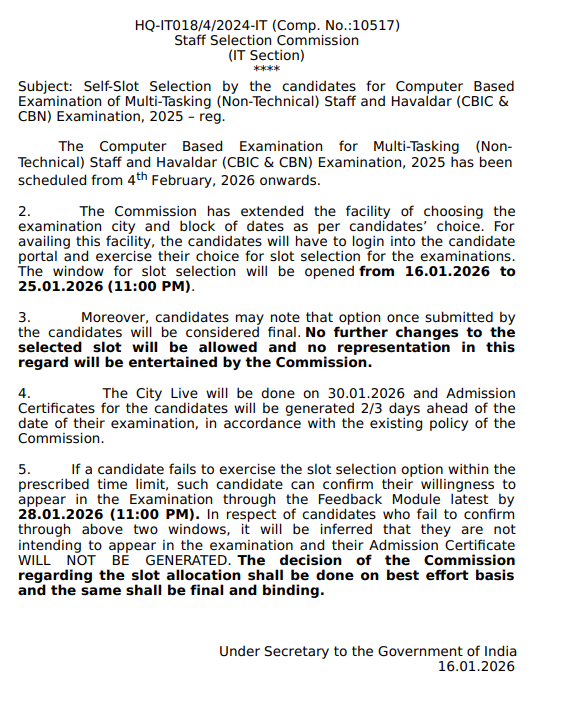
SSC MTS Self Slot Selection Notice
The SSC will conduct the CBE 2025 for MTS and Havaldar posts from 4 February 2026 onwards. Candidates can choose their exam city, date, and shift from 16 to 25 January 2026 (till 11:00 PM). Slot selection will be final with no changes allowed.
City details will be released on 30 January, and admit cards will be issued 2–3 days before the exam. Candidates who miss slot selection must confirm participation through the Feedback Module by 28 January 2026 (11:00 PM).
SSC MTS Self Slot Selection Notice PDF
SSC MTS Self Slot Booking Schedule 2026
As per the official notice, the details regarding the SSC MTS Self Slot Booking Schedule 2026 have been compiled in a table format. The commission has started the self-slot selection for the candidates. They can choose their slot for the exam as per their convenience.
|
SSC MTS Self Slot Booking Schedule 2026 |
|
|
Authority Name |
Staff Selection Commission |
|
Post Name |
MTS (Multi-Tasking Staff) |
|
SSC MTS Self Slot Booking Date |
January 16, 2026 (Started) |
|
SSC MTS Self Slot Booking Last Date |
25 January 2026 (up to 11:00 PM) |
|
SSC MTS Exam Date |
February 4, 2026 |
|
Official Website |
ssc.gov.in |
SSC MTS Self Slot Booking Link
The Staff Selection Commission (SSC) has activated the SSC MTS Slot Booking 2026 link on 16 January 2026 for the Multi-Tasking (Non-Technical) Staff and Havaldar (CBIC & CBN) Exam 2025. Candidates can now select their preferred exam date and time through the SSC MTS Self Slot Booking 2026 link available on the official website.
SSC MTS Self Slot Booking Link
How To Do SSC MTS Self Slot Booking 2026?
Candidates should follow the list of steps to complete the SSC MTS Self Slot Booking.
Step 1: Visit the SSC official website.
Step 2: Go to the login section on the homepage.
Step 3: Put the required credentials, like the registration number and date of birth.
Step 4: Login on the candidates' portal.
Step 5: Choose the slot for the exam, like date, shift and confirm.
Step 6: Submit the requirement and then log out.
Check out more information on the PW website. PW provides SSC exam content, including SSC Exams Updates, sample papers, mock tests, guidance sessions, and more. Also, enroll today in the SSC Online Batches for preparation.
SSC MTS Self Slot Booking 2026 FAQs
What is the date of the SSC MTS Self Slot Booking 2026?
SSC MTS Self Slot Booking 2026 has started from January 16, 2026.
How can I do my SSC MTS Self Slot Selection?
Candidates should visit the official SSC website to complete the SSC MTS Self Slot Selection process.
What is the schedule of SSC MTS exam 2026?
SSC MTS exam will be conducted on February 4, 2026 in different test centres in India.
What is expected date of SSC MTS Admit Card 2026 to be released?
SSC MTS Admit Card will be released in January/February 2026 (tenative).


Have questions about your prep?
Our experts can answer all your questions
Free Learning Resources
PW Books
Notes (Class 10-12)
PW Study Materials
Notes (Class 6-9)
Ncert Solutions
Govt Exams
Our Other Websites
Class 6th to 12th Online Courses
Govt Job Exams Courses
UPSC Coaching
Defence Exam Coaching
Gate Exam Coaching
Other Exams
Know about Physics Wallah
Physics Wallah is an Indian edtech platform that provides accessible & comprehensive learning experiences to students from Class 6th to postgraduate level. We also provide extensive NCERT solutions, sample paper, NEET, JEE Mains, BITSAT previous year papers & more such resources to students. Physics Wallah also caters to over 3.5 million registered students and over 78 lakh+ Youtube subscribers with 4.8 rating on its app.
We Stand Out because
We provide students with intensive courses with India’s qualified & experienced faculties & mentors. PW strives to make the learning experience comprehensive and accessible for students of all sections of society. We believe in empowering every single student who couldn't dream of a good career in engineering and medical field earlier.
Our Key Focus Areas
Physics Wallah's main focus is to make the learning experience as economical as possible for all students. With our affordable courses like Lakshya, Udaan and Arjuna and many others, we have been able to provide a platform for lakhs of aspirants. From providing Chemistry, Maths, Physics formula to giving e-books of eminent authors like RD Sharma, RS Aggarwal and Lakhmir Singh, PW focuses on every single student's need for preparation.
What Makes Us Different
Physics Wallah strives to develop a comprehensive pedagogical structure for students, where they get a state-of-the-art learning experience with study material and resources. Apart from catering students preparing for JEE Mains and NEET, PW also provides study material for each state board like Uttar Pradesh, Bihar, and others
Copyright © 2026 Physicswallah Limited All rights reserved.