







IBPS PO Prelims Scorecard 2026 Out @ ibps.in, Check Prelims Marks
IBPS PO Prelims Scorecard 2026 has been released on September 29. Candidates can download their scorecard from the official website ibps.in until October 28. Use Registration No./Roll No., Password/DOB (DD-MM-YY), and Captcha to log in. Download the scorecard from the official website and keep it for future reference.

IBPS PO Prelims Scorecard 2026 has been released on September 29, 2026. Candidates who appeared for the IBPS PO Prelims exam can now check their marks and download their scorecard online. The scorecard can be downloaded from September 29 to October 28, 2026.
To download the scorecard, candidates need to enter their Registration No./Roll No., Password/DOB (DD-MM-YY), and Captcha. Candidates should keep their login details ready before starting the download process. IBPS PO Mains exam is scheduled for October 4, 2026.
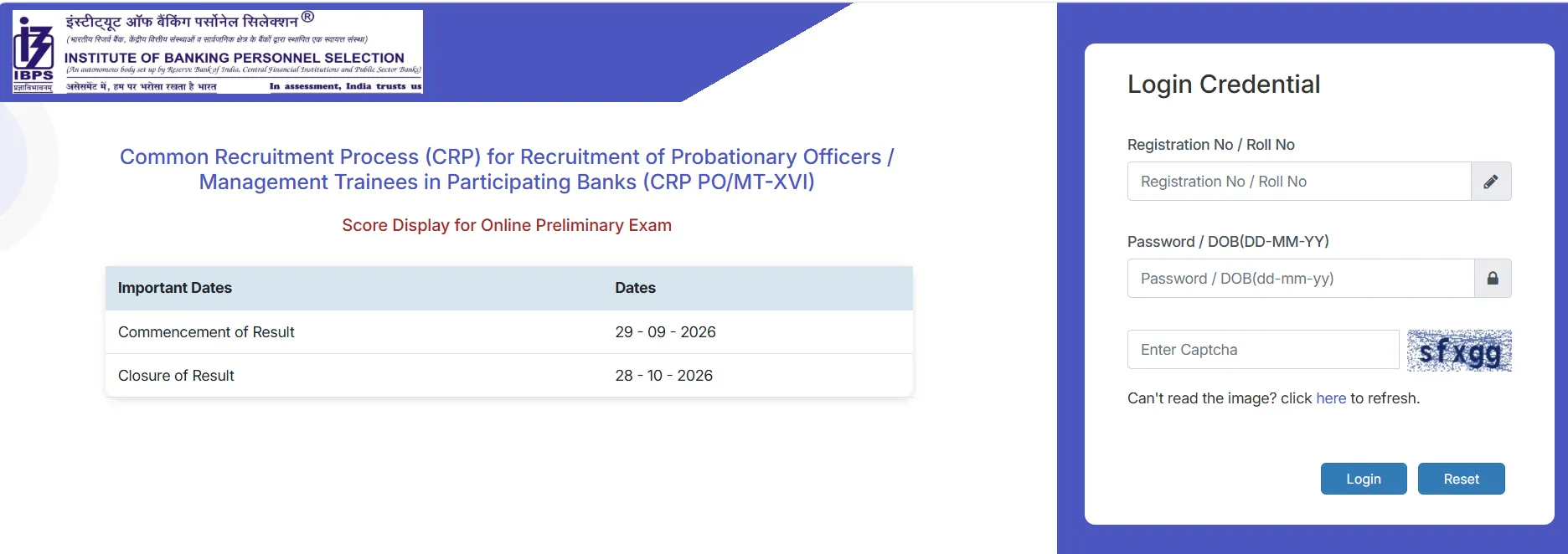
IBPS PO Prelims Scorecard 2026 Download Link
Candidates can download the IBPS PO Prelims Scorecard 2026 from the official IBPS website. The scorecard is available for a limited time. Candidates should download and save a copy before the last date. The official IBPS result login page uses the registration number or roll number and password or date of birth to access the online result.
IBPS PO Prelims Scorecard 2026 Overview
Candidates can check the IBPS PO prelims scorecard on the website. IBPS authority has released the scorecards of the candidates on their respective login portals. It can help candidates know the overall and sectional scores in the preliminary exam.
|
IBPS PO Prelims Scorecard 2026 Overview |
|
|
Exam Name |
|
|
Scorecard Release Date |
September 29, 2026 |
|
Scorecard Download Starts |
September 29, 2026 |
|
Last Date to Download |
October 28, 2026 |
|
Exam Mode |
Online |
|
Login Details |
Registration No./Roll No., Password/DOB, Captcha |
|
Prelims Exam Date |
August 22 and 23, 2026 |
|
October 4, 2026 |
|
|
Official Website Link |
ibps.in |
Credentials Required to Download IBPS PO Scorecard
Candidates need the following details to access the scorecard. The date of birth should be entered in the format shown on the login page. Candidates should also check their registration number or roll number carefully before clicking the login button.
-
Registration No. / Roll No.
-
Password / DOB (DD-MM-YY)
-
Captcha
How to Download IBPS PO Prelims Scorecard 2026?
Candidates can follow the steps below to download the scorecard and keep a printout for future reference.
-
Visit the official IBPS website.
-
Open the CRP PO/MT section.
-
Find the link for the IBPS PO Prelims Scorecard 2026.
-
Click on the scorecard link.
-
Enter the Registration No./Roll No.
-
Enter the Password/DOB (DD-MM-YY).
-
Enter the captcha shown on the screen.
-
Click on the Login/Submit button.
-
The IBPS PO Prelims scorecard will appear on the screen.
-
Check all the details and marks carefully.
-
Download the scorecard and save it for future use.
Details Mentioned on IBPS PO Prelims Scorecard 2026
IBPS PO Scorecard 2026 contains important details about the candidate and exam performance. Candidates should check the information carefully after downloading it.
The scorecard may include:
-
Candidate’s name
-
Roll number
-
Registration number
-
Exam name
-
Section-wise marks
-
Total marks
-
Score details
-
Cut-off marks, if provided
-
Qualifying status and other exam details
IBPS PO Prelims Score Calculation 2026
The IBPS PO Prelims exam follows a negative marking system. For the raw score, 1 mark is awarded for every correct answer.
For every wrong answer, 0.25 marks are deducted. Therefore, candidates should consider both correct and incorrect answers while calculating the raw score.
The formula can be written as:
Raw Score = Number of Correct Answers × 1 − Number of Incorrect Answers × 0.25
For example, if a candidate answers 60 questions correctly and gives 8 incorrect answers, the raw score will be:
60 − (8 × 0.25) = 58 marks
What After IBPS PO Prelims Scorecard 2026?
Candidates can use the scorecard to check their performance in the Prelims examination. Qualified candidates in the prelims exam should start preparing for the next stage and can prepare for the IBPS PO Mains examination.
As per the official IBPS 2026-27 calendar, the IBPS PO Mains exam is scheduled for October 4, 2026.
Candidates should check the official IBPS website regularly for updates about the next stage of the recruitment process.
Also Check: IBPS PO Mains Admit Card 2026
Common Problems While Downloading IBPS PO Scorecard
Candidates may face some common problems while accessing the scorecard. These problems can usually be handled by checking the login details and trying again.
-
Wrong Registration Number/Roll Number: Check the details before submitting the form.
-
DOB Error: Enter the date of birth in the required DD-MM-YY format.
-
Captcha Error: Enter the captcha correctly or refresh it and try again.
-
Website Not Loading: Wait for some time and try again.
-
Login Failed: Recheck the registration number, roll number, password, or date of birth.
-
Slow Website: A large number of candidates may access the website at the same time. Try again after some time.
IBPS PO Prelims Scorecard 2026 FAQs
When is the IBPS PO Prelims Scorecard 2026 released?
What is the last date to download the IBPS PO Scorecard 2026?
What details are needed to check the IBPS PO Prelims Scorecard?
How is the IBPS PO Prelims raw score calculated?
When is the IBPS PO Mains Exam 2026?







Get Free Counselling Today
and Clear up all your Doubts
 Live & recorded classes available at easeDashboard for progress trackingLakhs of practice questions

