






RBI Bank Office Attendant Correction Form 2026 Link Active
RBI Bank Office Attendant Correction Form 2026 window is active from February 10 (00:01 hours) to February 11 (23:59 hours). Candidates can correct specific application details for the 2025 Panel Year recruitment during these 2 days. A fee applies, but Bhopal Office candidates are exempt. This is the only opportunity before exams on February 28 and March 1, 2026.

RBI Bank Office Attendant Correction Form 2026: The Reserve Bank of India (RBI) has activated the link for the candidates to access the RBI Bank Office Attendant Correction Form 2026 window. Candidates can visit the login portal to edit the application form from February 10 to February 11, 2026, to use the application window. Edit the application form details carefully to appear for the exam scheduled for February 28 and March 1, 2026.
RBI Bank Office Attendant Correction Form 2026 Notice PDF
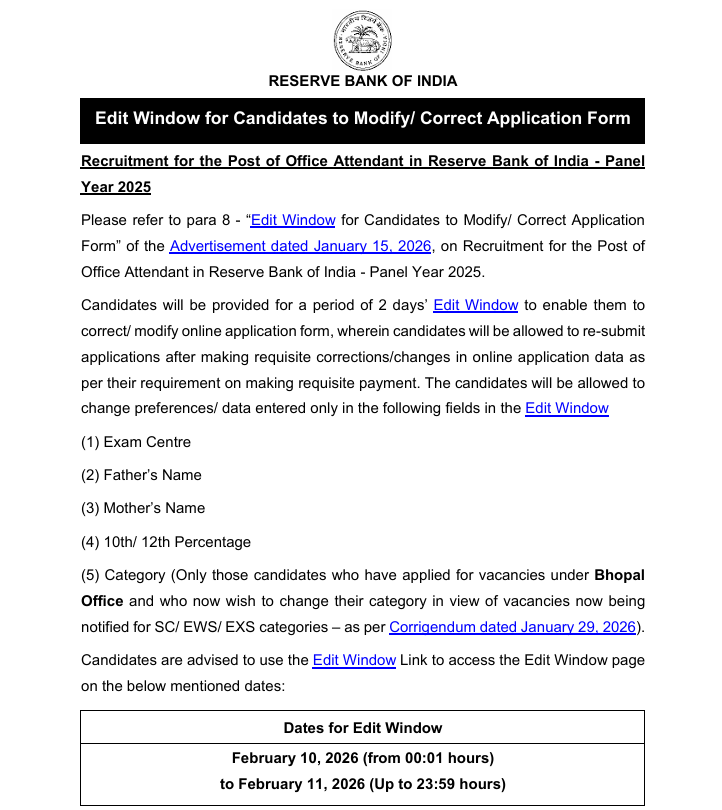
RBI Bank Office Attendant Correction Form 2026
Candidates should know the RBI Office Attendant Correction Form dates. They can make the required changes in the application form accordingly.
-
Correction Window Start: February 10, 2026 (00:01 hours)
-
Correction Window End: February 11, 2026 (23:59 hours)
-
Exam Dates: February 28 and March 1, 2026
RBI Bank Office Attendant Edit Window Link
RBI Office Attendant Edit Window Link is active on the login portal of the candidates. Visit the official candidates' login portal and log in using the Registration Number, Password, and Security Code to edit the application accordingly.
RBI Office Attendant Edit Window Link
Modifiable Fields in RBI Office Attendant Application
Candidates can edit the required fields in the RBI Office Attendance Application Form online.
-
Exam Centre: Adjust preferred examination centre location
-
Father’s Name: Correct spelling or format
-
Mother’s Name: Correct spelling or format
-
10th/12th Percentage: Update academic percentage marks
-
Category: For Bhopal Office candidates only: change category as per new vacancies (SC/EWS/EXS)
Non-Editable Details in RBI Office Attendant Application
The Reserve Bank of India does not permit alterations to some core personal information once the initial application is submitted. Review this list carefully to avoid any confusion.
-
Name
-
Email ID
-
Mobile Number
-
Correspondence Address
-
Permanent Address
RBI Office Attendant Correction Fee Structure
RBI Office Attendant Correction Fee Structure covers the administrative costs associated with modifying application details. Candidates must be aware of the applicable charges and payment procedures.
-
Fee Amount: ₹200/- (inclusive of GST)
-
Applicability: All candidates (uniform across categories)
-
Exemption: Bhopal Office candidates are exempt
-
Refund Policy: Non-refundable
-
Payment Mode: Online via the edit window portal
Steps to Edit RBI Office Attendant Application Form
Candidates should follow the steps to edit the RRB Office Attendant Application Form.
Step 1: Go to the RBI official website, the official recruitment page and access the Edit Window link.
Step 2: Log in using your unique registration credentials.
Step 3: Carefully review the application and make changes only in the permitted fields.
Step 4: Pay the required correction fee to proceed with resubmission.
Step 5: Verify all updated details thoroughly before the final submission.
Step 6: Download the corrected application for your records.
Important Instructions & Guidelines
Candidates must review the guidelines and follow them carefully before making any changes.
-
Corrections are permitted only once.
-
Only your latest application will be considered for modifications.
-
If multiple applications were submitted, ensure you edit the most recent one.
-
No alterations can be made once the correction window closes.