







CAT On-Screen Calculator Explained: Features, Limitations & Tips for CAT 2026
The CAT on-screen calculator is a basic tool for arithmetic calculations during the exam. While it doesn't support logarithms, trigonometry, exponents, or other scientific functions, understanding its features, limitations, and practising with it regularly can help candidates save time and improve accuracy in CAT 2026.



Many CAT aspirants believe the on-screen calculator is slow, difficult to use, or simply not worth relying on during the exam. This perception often comes from using it for the first time on exam day or expecting it to function like a scientific calculator.
In reality, the CAT calculator is designed for a different purpose. It handles basic calculations efficiently, allowing candidates to spend less time on arithmetic and more time solving Quantitative Aptitude and Data Interpretation problems.
What Is the CAT On-Screen Calculator?
Candidates appearing for CAT are not allowed to carry a physical calculator into the examination hall. Instead, the exam provides a built-in on-screen calculator that remains available throughout the test.
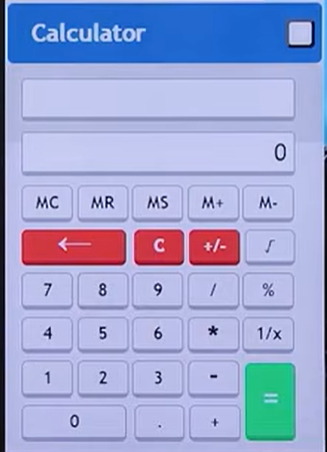
Many students expect this calculator to perform advanced mathematical functions such as logarithms, trigonometric calculations, higher-order roots, or equation solving. However, the CAT calculator is intentionally designed as a basic calculator, similar to the standard Windows calculator, and its interface has remained largely unchanged over the years.
Rather than replacing mathematical concepts, it is meant to simplify routine calculations so candidates can focus on logical thinking and problem-solving.
What Can the CAT Calculator Do?
Although it is not a scientific calculator, the CAT calculator includes all the basic functions required during the examination.
It supports:
-
Addition
-
Subtraction
-
Multiplication
-
Division
-
Square Root
-
Percentage calculations
-
Reciprocal (1/x)
-
Memory functions (MS, MR, M+, M-, MC)
These functions are sufficient for handling most arithmetic calculations that arise while solving Quantitative Aptitude and Data Interpretation questions.
Limitations of the CAT Calculator (What It Cannot Do)
The CAT calculator does not support advanced mathematical operations typically found in scientific calculators:
-
Powers/Exponents: Cannot directly calculate 3^3, 3^4, etc. These must be computed through repeated multiplication.
-
Roots other than Square Root: Cannot calculate cube roots, fifth roots, etc.
-
Logarithms: This is a significant limitation, as log-based questions frequently appear.
-
Trigonometric Functions
-
Equation Solving
-
Graphing
-
Factorials (e.g., 5! must be calculated as 1 * 2 * 3 * 4 * 5)
Why Does CAT Provide Only a Basic Calculator?
The purpose of the CAT calculator is not to solve mathematical problems for candidates. Instead, it reduces the time spent on lengthy arithmetic so that candidates can focus on applying concepts.
CAT primarily tests:
-
Quantitative Ability
-
Data Interpretation
-
Logical reasoning
-
Problem-solving skills
Providing a scientific calculator would reduce the emphasis on these abilities by allowing candidates to directly compute logarithms, exponents, and other advanced mathematical operations.
Unlike several other management entrance examinations that do not provide any calculator, CAT offers a basic calculator to support calculations while still assessing conceptual understanding.
Common Myths About the CAT Calculator
Many opinions about the CAT calculator arise because candidates are unfamiliar with its purpose.
|
Myth |
Reality |
|
The calculator is useless. |
It is useful for lengthy calculations when used correctly. |
|
It performs calculations incorrectly. |
Computational errors occur because of incorrect user input, not the calculator itself. |
|
It is too slow. |
Lack of practice usually makes it feel slow. |
|
It should support scientific functions. |
CAT intentionally provides only a basic calculator. |
|
Mouse-only input wastes time. |
Keyboard input is disabled across the examination to maintain uniformity for all candidates. |
Optimal Usage of the CAT Calculator
When to Use the Calculator:
-
For complex calculations that cannot be easily done mentally.
-
For TITA (Type In The Answer) questions where exact numerical values are required, and approximations might lead to errors.
-
When dealing with irrational numbers (e.g., square roots of non-perfect squares) that need to be part of a larger calculation.
When NOT to Use the Calculator:
-
For simple calculations like 812 / 4. Such operations can be done mentally, saving time and mental focus.
-
Using the calculator for trivial calculations can break concentration and involve unnecessary switching.
To familiarize yourself with the CAT calculator's exact functions and interface, use the standard Windows calculator. Developing habits on other calculators can be detrimental on exam day.
How to Practice Using the CAT Calculator
The biggest mistake candidates make is using the CAT calculator for the first time during the examination.
To become comfortable with its interface:
-
Practice regularly using the standard Windows calculator.
-
Solve mock tests using only the on-screen calculator.
-
Learn when mental calculations are faster.
-
Use memory functions during practice sessions.
-
Develop speed with mouse-based inputs.
Regular practice helps eliminate hesitation and makes calculator usage more natural on exam day.
The CAT on-screen calculator is not meant to replace mathematical understanding but to simplify routine calculations. Knowing when to rely on it—and when mental calculations are faster—can help you manage time more effectively during the exam. Regular practice with the calculator before CAT 2026 will help you use it confidently on test day.





FAQs
Why is a physical calculator not allowed in the CAT exam?
What are the core functions of the CAT on-screen calculator?
What advanced mathematical operations can the CAT calculator NOT perform?
Why do many users find the CAT calculator slow or error-prone?

Get Free Counselling Today
and Clear up all your Doubts
 Live & recorded classes available at easeDashboard for progress trackingLakhs of practice questions

