







RRB Group D 2026 Official Mock Test Link Active: Sign-in Page Live
RRB Group D 2026 Official Mock Test Link Active notification confirms that the official mock exam sign-in page is now live. Aspirants can access the TCS iON sign-in page to experience the real CBT interface, practice question palette navigation, review default login parameters, and configure language preferences prior to the actual examination.
RRB Group D 2026 Official Mock Test Link Active: The Indian Railways Recruitment Board has made an important update regarding the upcoming examination. An official interface is now accessible, providing candidates with access to a mock examination. This platform is designed to simulate the actual test environment.
Candidates can utilise this resource to become familiar with the exam format and procedure well before the main event, ensuring they are prepared for the RRB Group D 2026 examination. The activation of the RRB Group D 2026 Official Mock Test Link in Active status is a crucial step for aspirants.
Also Read:
RRB Group D 2026 Official Mock Test
RRB Group D 2026 Official Mock Test Link Active notification confirms that the official mock exam sign-in page is now live. Aspirants can access the TCS iON sign-in page to experience the real CBT interface.
RRB Group D 2026 Official Mock Test Details
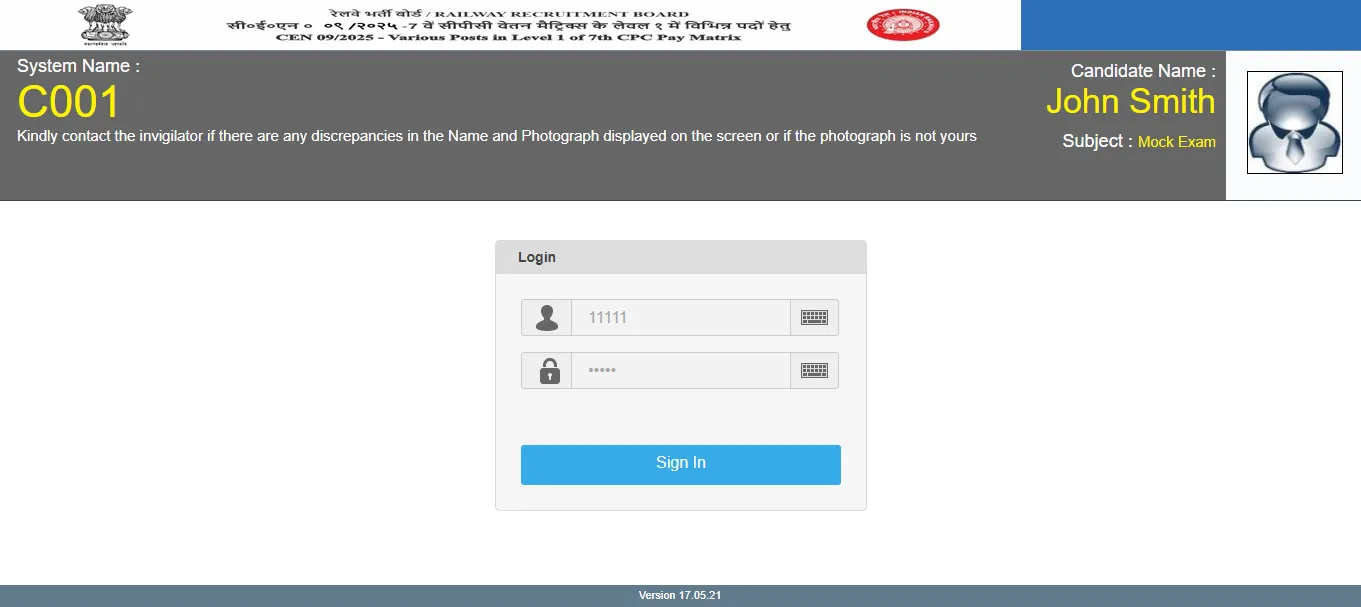
The mock exam sign-in page provides a clear overview of the system and user identification. Candidates should review these details to ensure accuracy during their practice session.
| RRB Group D 2026 Official Mock Test Details | |
|---|---|
| Particulars | Details |
| System Name | C001 |
| Candidate Name | Placeholder Candidate Identity |
| Subject | Mock Exam |
| Interface Version | 17.05.21 |
| Hosting Platform | TCS iON Assessment Engine |
| Sign-in Access | Direct / Auto-filled Dummy Credentials |
The sign-in page also features several interactive options for candidates. These include a link to report discrepancies if the name and photograph shown are incorrect, and a language selector to change the display language. An essential 'Sign in to Continue' button allows candidates to proceed with the mock test.
RRB Group D 2026 Official Mock Test Link
When candidates access the official mock login page, they are presented with a simulated test hall login layout. Candidates can use the link given below to access the mock test. Click the button below to attempt -
RRB Group D 2026 Official Mock Test Direct Link
RRB Group D 2026 Mock Test Sign-in-Page Key Features
The preliminary login screen provides several interactive tools designed to help candidates verify their technical configuration and personal details:
-
Language Selector: Located in the top right corner, allowing candidates to toggle the default instructions and question text between English, Hindi, and regional languages.
-
Discrepancy Reporting Link: A prominent link titled "Click here if the Name and Photograph shown on the screen is not yours" to guide candidates on profile reporting procedures.
-
General Exam Instructions: A comprehensive set of guidelines outlining timer behaviour, question palette colour codes, and navigation buttons.
-
'Sign In to Continue' Button: The primary call-to-action button to initiate the timer and load the examination interface
How to Access the RRB Group D Official Mock Test
Candidates can easily open and take the official mock test by following these sequential steps:
1. Visit Regional RRB Portal:
Open your browser and navigate to your official regional Railway Recruitment Board portal (e.g., rrbcdg.gov.in, rrbapply.gov.in, or rrbpryj.gov.in).
2. Click the Official Mock Test Link:
Locate and click the notification reading "Link for Mock Test for Computer Based Test (CBT) under Group D / Level-1 Recruitment 2026".
3. Access the Sign-In Page:
You will be redirected to the TCS iON assessment server. Leave the default dummy User ID and Password intact, then click "Sign In".
4. Select Language & Read Instructions:
Choose your preferred medium of instruction from the dropdown menu. Carefully read the rules, tick the declaration checkbox, and click "I am ready to begin" to launch the test.
RRB Group D Exam Pattern & Syllabus Structure
The official mock test mimics the real exam pattern laid down by the Railway Recruitment Board. It comprises 100 objective questions to be solved within a 90-minute window:
| RRB Group D Exam Pattern & Syllabus Structure | |||
| Subject / Section | Number of Questions | Marks | Allocated Time |
| Mathematics | 25 Questions | 25 Marks | Combined 90 Minutes |
| General Intelligence & Reasoning | 30 Questions | 30 Marks | (120 minutes for eligible PwBD candidates with scribes) |
| General Science | 25 Questions | 25 Marks | |
| General Awareness & Current Affairs | 20 Questions | 20 Marks | |
| Total Evaluation | 100 Questions | 100 Marks | 90 Minutes Total |
Marking Scheme: Each correct response awards +1 mark. There is a negative marking of 1/3 for every incorrect answer. Questions marked for review without an answer receive 0 marks.
Important Guidelines for RRB Group D 2026 Exam Day
-
Profile Verification: If your name or photograph is not displayed accurately on your actual hall ticket or actual screen, alert the test center invigilator immediately.
-
Time Management: Practice using the on-screen digital clock to pace yourself through 100 questions. Do not spend more than 1 minute on a single calculation.
-
Rough Sheets: Invigilators will provide physical rough sheets inside the lab. Write your Roll Number and Name on top of each sheet before using it.
-
Final Submission: The examination automatically submits when the timer hits zero. Do not attempt to close or refresh the browser window manually.
PW provides Railway exam content, including Railway Exam Blogs, sample papers, mock tests, guidance sessions, and more. Also, enroll today on Railway Online Coaching for preparation.
RRB Group D 2026 Official Mock Test FAQs
Q1: Is the RRB Group D 2026 Official Mock Test Link Active now?
Q2: What is the purpose of the RRB Group D 2026 mock test?
Q3: What information is displayed on the mock test sign-in page?
Q4: Can I change the language of the mock test?
Q5: What should I do if my name or photograph is incorrect on the mock test page?






Get Free Counselling Today
and Clear up all your Doubts
 Live & recorded classes available at easeDashboard for progress trackingLakhs of practice questions

