








How to Download UGC NET 2026 Admit Card?
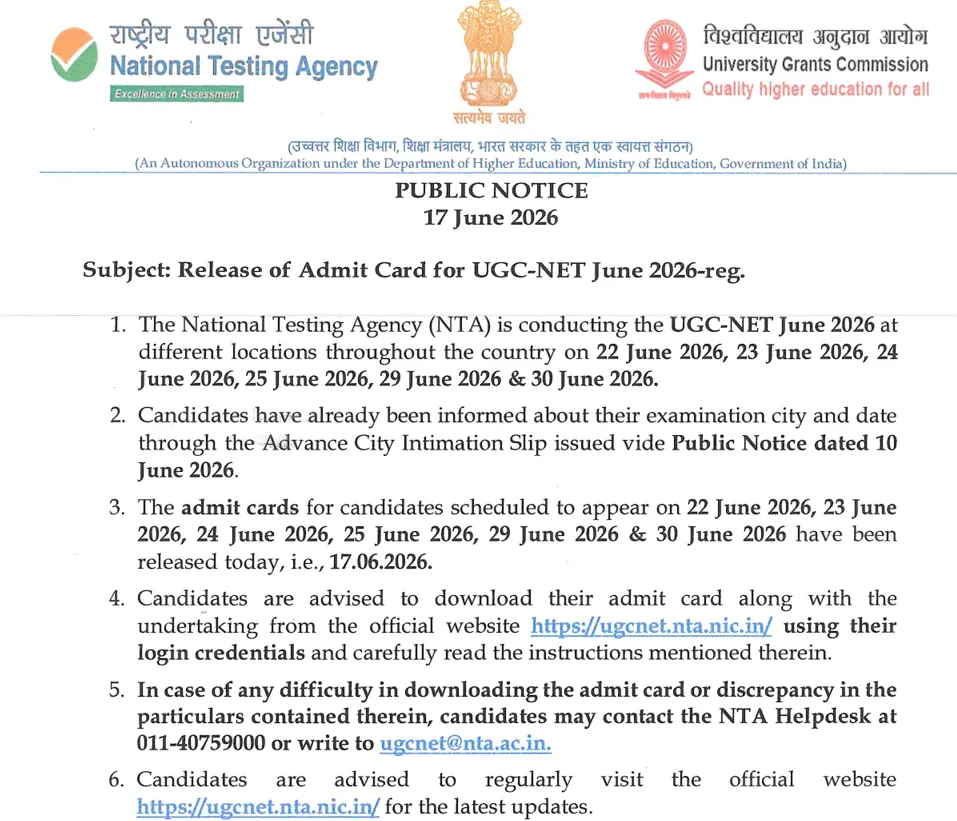
UGC NET 2026 Admit Card Download Link has been released on June 17, 2026 on the official website ugcnet.nta.nic.in. Use the credentials include the application number and password, to download the call letter for the exam scheduled from June 22 to June 30, 2026.

How To Download UGC NET 2026 Admit Card: The National Testing Agency (NTA) is the conducting authority for the UGC NET 2026 exam to begin from June 22 to June 30, 2026. A notice has been issued informing candidates that the UGC NET 2026 admit card has been released on June 17, 2026. Candidates can visit the website to use the login credentials for downloading the call letter for the examination. It is one of the essential documents for the candidates to carry on the exam day. The security authority can allow them to write the UGC NET exam.
How to Download UGC NET 2026 Admit Card?
Candidates should follow the simple steps to download the UGC NET call letter for the exam.
Step 1: Visit the official UGC NET website.
Step 2: Click on the "UGC NET 2026 Admit Card" link available on the homepage.
Step 3: Enter your Application Number, Date of Birth/Password, and Security Pin.
Step 4: Click on the Submit/Login button.
Step 5: The UGC NET Admit Card 2026 will appear on the screen.
Step 6: Verify all details mentioned on the admit card carefully.
Step 7: Download the admit card PDF and save it for future reference.
Step 8: Take at least two printouts of the admit card for the examination day.
Details Required to Download UGC NET Admit Card 2026
Candidates need the three important credentials to be entered correctly for downloading the UGC NET Call Letter for the exam. It includes the application number, date of birth or password, and captcha code.
H3: Application Number
-
Candidates must enter the application number generated during registration.
H3: Date of Birth or Password
-
Use the registered date of birth or password to access the admit card portal.
H3: Security Captcha
-
Enter the security code displayed on the login page for verification.
UGC NET 2026 Admit Card Download Link
UGC NET 2026 Admit Card Download Link has been provided for the candidates on the official website. Candidates can access the call letter for the exam using the application number and password. The candidates should check all the details carefully before downloading and taking the printout of the admit card.
Details Mentioned on UGC NET Admit Card
Candidates should download the admit card and check the details mentioned on it carefully.
-
Candidate's Name
-
Roll Number
-
Application Number
-
Photograph and Signature
-
Exam Date
-
Shift Timing
-
Reporting Time
-
Exam Centre Name and Address
-
Subject Name and Code
-
Important Exam Day Instructions
Documents to Carry Along with UGC NET Admit Card
A list of documents has been mentioned for the candidates to carry for the UGC NET Exam Scheduled to start from June 22.
-
Printed copy of the UGC NET Admit Card 2026.
-
Valid Photo Identity Proof (Aadhaar Card, PAN Card, Passport, Voter ID, Driving Licence, etc.).
-
Passport-size photograph (if mentioned in the instructions).
What to Do If You Cannot Download the Admit Card?
Candidates find issues when downloading the admit card. Then, check the credentials entered to download the admit card carefully. Candidates can connect with the NTA team on the helpdesk to resolve the issue.
-
Check the entered application number and password carefully.
-
Use the "Forgot Application Number" or "Forgot Password" option available on the login page.
-
Clear browser cache and try again.
-
Attempt login during non-peak hours if the website is slow.
-
Contact the NTA helpdesk if the issue persists.
Important Instructions After Downloading the UGC NET Call Letter
-
Verify all personal and exam-related details.
-
Ensure the photograph and signature are clearly visible.
-
Read all exam-day guidelines carefully.
-
Report any discrepancy to NTA immediately.
-
Keep multiple copies of the admit card until the admission process is completed.
How to Download UGC NET 2026 Admit Card? FAQs
How can I download the UGC NET 2026 Admit Card?
What login credentials are required to access the UGC NET Admit Card?
What should I do if I forget my application number?
What should I do if there is an error in my admit card?


Have questions about your prep?
Our experts can answer all your questions




 Live & recorded classes available at easeDashboard for progress trackingLakhs of practice questions

