







How to Download UGC NET June 2026 Result: Direct Link & Steps
UGC NET June 2026 Result Download Link is available on the official UGC NET website, ugcnet.nta.nic.in. The result has been declared on August 28. Candidates can visit the website and click the June 2026 Score Card link. Enter the required login details, and download the result. Keep a copy of the scorecard safe for future use.



How to Download UGC NET June 2026 Result: The National Testing Agency (NTA) has officially announced the UGC NET June 2026 Result, Scorecard, and CutOff on August 28, 2026. Candidates can visit the website to download the online scorecards using the Application Number, Password, and Security PIN. English, Commerce and Sociology subjects will be re-conducted on September 9 and September 10, 2026. The results of these subjects will be declared after the exam is conducted for the candidates.
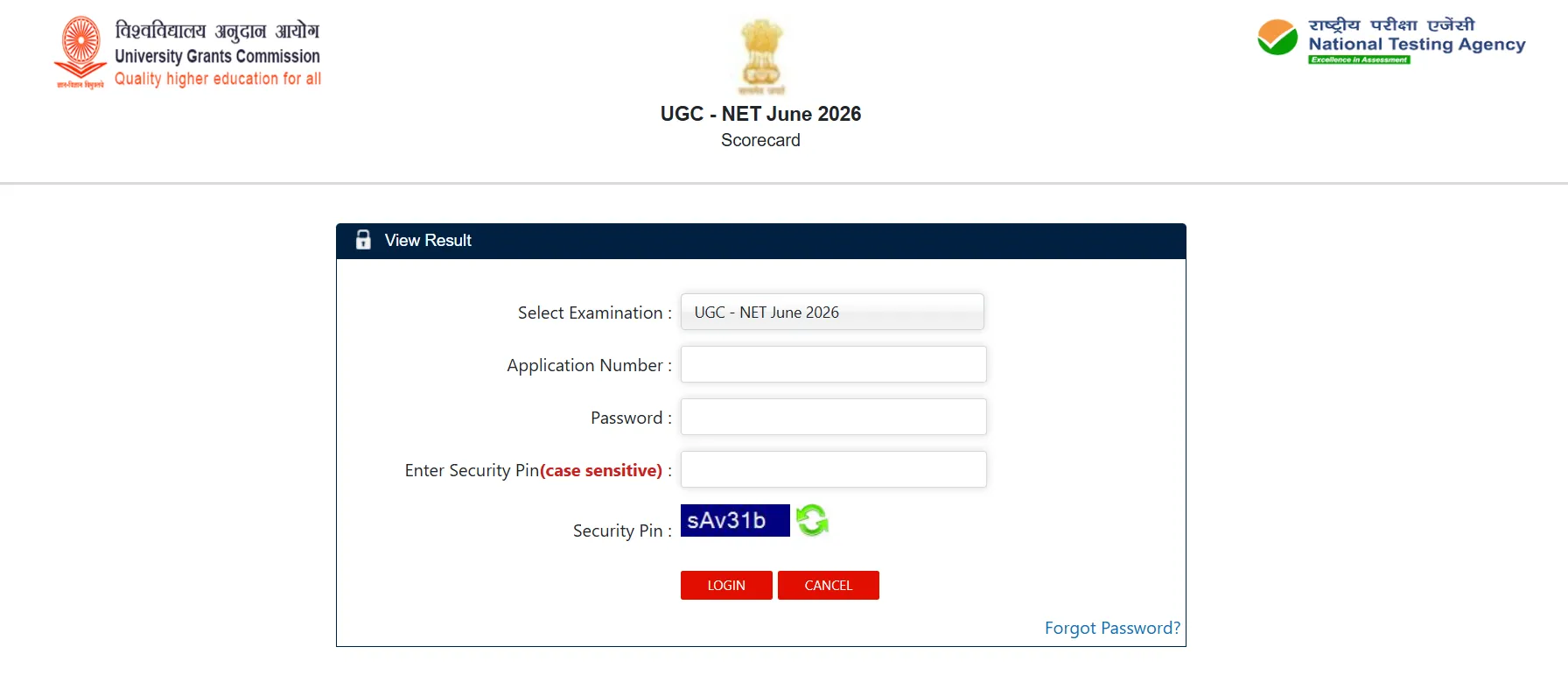
UGC NET June 2026 Result Download Link
Candidates can get the direct link to download the UGC NET June scorecard from the official website. They should know the marks scored in the exam and proceed to the next levels after the result announcement. Enter the credentials, including the Application Number, Password, and Security PIN, carefully to download the scorecard from the website.
UGC NET June 2026 Result Overview
UGC NET June 2026 Result and scorecard have been released on the official website. Candidates can download the scorecard from the portal to know the marks scored in the UGC NET competitive examination.
|
UGC NET June 2026 Result Overview |
|
|
Exam Name |
UGC NET June 2026 |
|
Conducting Body |
National Testing Agency (NTA) |
|
Exam Session |
June 2026 |
|
Result Mode |
Online |
|
Result Date |
August 28, 2026 |
|
Result/Score Card |
Available online |
|
Official Website |
ugcnet.nta.nic.in |
How to Download UGC NET June 2026 Result?
Candidates can follow the steps given below to download the UGC NET June 2026 Result:
Step 1: Visit the Official Website
Go to the official UGC NET website at ugcnet.nta.nic.in.
Step 2: Find the Result Link
On the homepage, look for the UGC-NET June 2026 Score Card link under the Candidate Activity section.
Step 3: Enter Login Details
Click on the score card link. A login page will open. Enter the required details, such as the Application Number, Password, and Security PIN.
Step 4: Submit the Details
After entering the details, check them carefully and click on the Submit button.
Step 5: View the Result
UGC NET June 2026 result or scorecard will appear on the screen. Check all the details carefully.
Step 6: Download the Score Card
Click on the download option and save the score card on the device.
Step 7: Take a Printout
Candidates should take a printout of the score card and keep it safe for future use.
Details Mentioned on UGC NET June 2026 Result
Candidates should check all the details after downloading the scorecard. If any error is found, the concerned authority should be contacted through the official website.
-
Candidate's name
-
Application number
-
Roll number
-
Subject
-
Category
-
Marks obtained
-
Qualifying status
-
Other examination details
What If the UGC NET Result Page Is Not Opening?
Candidates may face the issue of the UGC NET result page not opening. It may be due to the internet connection, heavy traffic, or website loading. Be careful and follow the steps accordingly to download the scorecard from the NTA website.
-
Check the internet connection.
-
Refresh the page.
-
Try another browser.
-
Clear the browser cache.
-
Try again after some time if the website has heavy traffic.
-
Use the alternate scorecard link provided by NTA.
What After Downloading UGC NET June 2026 Result?
After downloading the result, candidates should check their marks and qualifying status. The scorecard should be kept safely for future admission, recruitment, or other academic purposes. Candidates should also check the official UGC NET website for further updates related to the result and certificates.
Important Points
-
The result can be checked only through the online mode.
-
Candidates should use the correct login details.
-
A stable internet connection should be used while downloading the scorecard.
-
The downloaded scorecard should be saved for future use.
-
Candidates should check the official website for any further updates.
UGC NET Eligibility Criteria Guidelines
The eligibility, self-declaration, and other required documents of eligible candidates will be checked as per the rules given in the UGC-NET June 2026 Information Bulletin. The UGC-NET June 2026 Result will be available on the official website. Candidates can log in to the website to view, download, and print their scorecard.
How to Download UGC NET June 2026 Result FAQs
How can I download the UGC NET June 2026 Result?
Where can I check the UGC NET June 2026 Result?
What details are needed to download the UGC NET result?
What should be done after downloading the UGC NET score card?








Get Free Counselling Today
and Clear up all your Doubts
 Live & recorded classes available at easeDashboard for progress trackingLakhs of practice questions

