







NTA JEE Main 2027 Registration Advisory: Check DigiLocker, Re-KYC and Class 10 Details



National Testing Agency (NTA), under the Department of Higher Education, Ministry of Education, Government of India, issued a public notice on October 28, 2026, regarding the registration process for Joint Entrance Examination (Main) 2027 Session 1.
The advisory clarifies which digital identity credentials candidates should use, when to complete Re-KYC through DigiLocker, and how their personal details should match their Class 10 records. Candidates should review these instructions before submitting the online application form to help avoid discrepancies during identity verification and subsequent stages of the examination.
NTA JEE Main 2027 Registration Advisory: Overview
| Particulars | Details |
|---|---|
| Examination Name | Joint Entrance Examination (JEE Main) 2027 |
| Conducting Authority | National Testing Agency (NTA) |
| Session | Session 1 |
| Advisory Date | October 28, 2026 |
| Session 1 Examination | January 2027 |
| Session 2 Examination | April 2027 |
| Registration Mode | Online |
| Key Instructions | Digital identity credentials, DigiLocker Re-KYC and Class 10 details |
| Official Website | jeemain.nta.nic.in |
| Official Advisory | Read the NTA public notice |
The advisory focuses on registration and identity-verification requirements. Candidates should refer to the official JEE Main 2027 application portal and information bulletin for the complete examination schedule, application deadlines, fee details and other requirements. For the latest registration updates, candidates can also read PW's JEE Main 2027 Session 1 registration update.
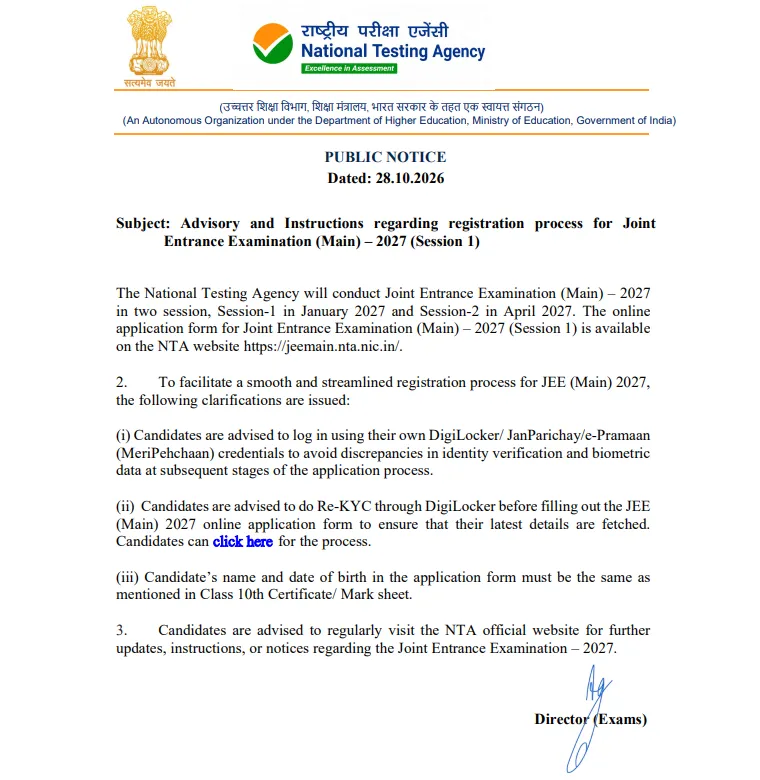
JEE Main 2027 Registration Advisory: Important Instructions
NTA has highlighted three key requirements for candidates applying for JEE Main 2027 Session 1. Students should review each requirement before completing their application.
Use Your Own DigiLocker, JanParichay or e-Pramaan Credentials
Candidates are advised to log in using their own DigiLocker, JanParichay or e-Pramaan (MeriPehchaan) credentials. According to NTA, this is intended to help prevent discrepancies in identity verification and biometric data during subsequent stages of the application process.
Candidates should use their personal credentials rather than another person's account. They should also ensure that they can access the account they intend to use before starting registration.
For step-by-step guidance, candidates can read PW's JEE Main 2027 registration guide through MeriPehchaan.
Complete DigiLocker Re-KYC Before Filling Out the Application Form
NTA advises candidates to complete Re-KYC through DigiLocker before filling out the JEE Main 2027 online application form. The purpose is to ensure that their latest details are fetched during registration.
Candidates can visit the official DigiLocker website, sign in to their own account and follow the verification instructions displayed on the platform. Once the required steps are complete, they can proceed to the official JEE Main website to fill out the application form.
Candidates should follow the instructions displayed on the official platform and avoid relying on unofficial procedures.
Match Your Name and Date of Birth With Your Class 10 Certificate
NTA has clarified that the candidate's name and date of birth entered in the JEE Main 2027 application form must match the details mentioned on their Class 10 certificate or marksheet.
Before submitting the form, candidates should:
-
Check the spelling and order of their name.
-
Verify their date of birth against their Class 10 records.
-
Review the personal information fetched through the digital identity platform.
-
Check the completed application form for discrepancies.
If any information does not match, candidates should consult the relevant issuing authority and follow NTA's official instructions before submitting the application. They should not assume that every discrepancy can be corrected after submission.
Candidates can also refer to PW's JEE Main 2027 Session 1 registration documents checklist and complete list of documents required for JEE Main 2027 registration to prepare their documents before applying.
Check the Official Website for Further Updates
Candidates should regularly visit the official JEE Main website for additional notices and instructions concerning JEE Main 2027. They can also check PW's JEE Main 2027 registration fees and documents guide for related application information.
JEE Main 2027 Session 1 Registration: How to Apply Online
Candidates can complete the application process through the official NTA portal. Before starting, they should read the information bulletin and ensure that their personal details and required documents are ready.
-
Visit the official JEE Main website.
-
Open the JEE Main 2027 Session 1 online application link.
-
Register using the required details if applying for the first time.
-
Log in using the credentials created during registration.
-
Fill out the application form with the required personal, academic and examination details.
-
Verify that the name and date of birth match the Class 10 certificate or marksheet.
-
Upload the required documents in the prescribed format.
-
Pay the applicable examination fee and review the application before final submission.
-
Download and save the confirmation page for future reference.
For additional guidance on the application process, candidates can refer to PW's JEE Main 2027 application form filling guide.
Candidates should follow the deadlines and instructions published by NTA. For the examination schedule, they can check PW's JEE Main Session 1 final exam dates for 2027 and the revised NTA exam calendar for 2027.
Candidates preparing for the examination can also review PW's JEE Main 2027 exam pattern for Paper 1 and Paper 2 to understand the question format and marking scheme.
JEE Main 2027 Registration Advisory: Official Contact Details
Candidates who need assistance with registration can refer to the contact information provided in the official notice.
| Communication Channel | Details |
|---|---|
| Office Address | Fifth Floor, Government of India Press Building, Minto Road, New Delhi – 110002 |
| Helpline Telephone | 011-40759000 |
| Official Support Email | jeemain@nta.ac.in |
| Official Website | jeemain.nta.nic.in |
Candidates should use the official portal and published contact details for clarification regarding their application or identity-verification requirements.
JEE Main 2027 Registration Advisory FAQs
When was the NTA JEE Main 2027 registration advisory released?
Which login credentials are recommended for JEE Main 2027 registration?
Why is Re-KYC verification through DigiLocker advised?
Which document must match the candidate's name and date of birth in the application form?
In which months will JEE Main 2027 be conducted?


Have questions about your prep?
Our experts can answer all your questions