CSEET October 2026 Admit Card Out, Download E-Admit Card & Check Exam Dates
CSEET October 2026 Admit Card is out on icsi.edu. Download your ICSI CSEET E-Admit Card using your Unique ID and DOB for the Oct 1 to Oct 6 exam session. The Institute of Company Secretaries of India (ICSI) has officially released the CSEET October 2026 E-Admit Card on icsi.edu. Download hall tickets using your 17-digit Unique Request ID and Date of Birth.



The Institute of Company Secretaries of India (ICSI) will release the CSEET October 2026 Admit Card online for registered candidates. If you are preparing to take the CS Executive Entrance Test this session, securing your hall ticket is your primary operational step. ICSI does not issue physical admit cards by post, making the online download process mandatory for every applicant.
CSEET October 2026 Admit Card Out Latest Update
ICSI typically issues the CSEET October 2026 Admit Card 7 to 10 days before the official exam date. Candidates must keep their credentials ready to access the document through the student portal as soon as it goes live.
-
Exam Conducting Body: Institute of Company Secretaries of India (ICSI)
-
Examination Name: CS Executive Entrance Test (CSEET) October 2026
-
Document Name: CSEET October 2026 Admit Card / E-Admit Card
-
Admit Card Status: Expected Soon (10 Days Prior to Exam)
-
Official Portal: icsi.edu
-
Login Credentials Required: Unique CSEET Application Number & Date of Birth
What is the CS Executive Entrance Test (CSEET)?
The CS Executive Entrance Test (CSEET) serves as the official qualifying entrance exam for entry into the CS Executive Programme offered by ICSI. Managed directly by the Ministry of Corporate Affairs, Government of India, ICSI ensures that aspiring Company Secretaries meet standard academic criteria before advancing.
Passing this test eliminates the traditional foundation route for most students, establishing a direct gateway toward a professional career in corporate governance, compliance, and legal advisory.
Also Check - CSEET October 2026 Business Communication: Important Topics & Revision
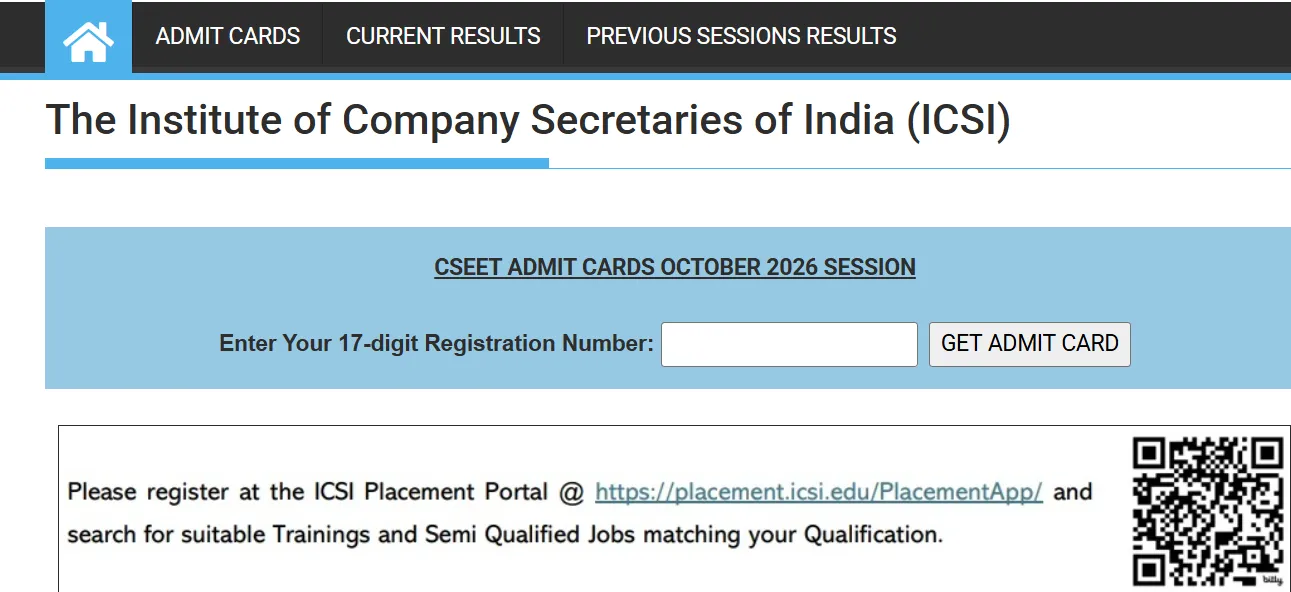
CSEET Admit Card October 2026 Download Link
The ICSI CSEET October 2026 Admit Card has been released. Candidates can download their hall ticket through the official ICSI website using their required login details.
- Exam: CSEET October 2026
- Admit Card Status: Released
CSEET Admit Card October 2026 Download Link
How to Download Your ICSI CSEET October 2026 E-Admit Card
Follow this step-by-step guide to download your CSEET October 2026 Admit Card without encountering portal errors:
-
Visit the Official ICSI Portal: Go to icsi.edu.
-
Navigate to the Latest Updates Section: Click on the Student tab on the top menu bar and select CSEET.
-
Locate the Download Link: Click on the link titled "Download E-Admit Card for CSEET October 2026 Session".
-
Enter Login Credentials: Input your 11-digit CSEET Application Number (Unique Registration Number) and your Date of Birth (DD/MM/YYYY).
-
Submit and Verify: Check the captcha verification box and click on Login.
-
Download and Print: Your admit card will appear on the screen. Save the PDF and print at least two clean copies on standard A4 paper.
Also Check - CSEET October 2026 Business Law and Management: Important Topics & Revision
Details Mentioned on the CSEET Hall Ticket
Once you open your CSEET October 2026 Admit Card, double-check all details printed on it. Any mismatch could cause verification flags during the remote proctoring session.
-
Candidate’s Full Name and Photograph
-
Signature of the Candidate
-
CSEET Registration / Application Number
-
Roll Number & Batch Time Slot
-
Exam Date and Allocated Time Window
-
Technical Guidelines for Remote Proctored Test
-
Permissible and Banned Items List
Important Instructions for CSEET October 2026 Exam Day
Since ICSI conducts the test via a Remote Proctored environment, your physical setup must match official requirements:
-
Mandatory Documents: Keep a physical printed copy of your CSEET October 2026 Admit Card along with a government-issued photo ID (Aadhaar Card, Passport, Voter ID, or PAN Card) beside your desktop/laptop.
-
Hardware Requirements: Ensure your laptop or desktop has a functional webcam, microphone, and a stable internet connection. Mobile phones, tablets, and smartwatches are strictly prohibited.
-
SEB Installation: Download and install the prescribed Safe Exam Browser (SEB) well before the test date using the link sent via email by ICSI.
-
Environment Setup: Sit in a quiet, well-lit room. Ensure no other person enters the room during the entire duration of the exam.
CSEET Exam Date 2026
The CSEET October 2026 examination will be conducted on 1, 3, 5 and 6 October 2026 as per the official ICSI timetable.
- 1 October 2026: Business Communication
- 3 October 2026: Fundamentals of Accounting
- 5 October 2026: Economic and Business Environment
- 6 October 2026: Business Laws and Management (OMR Based)
- Exam Timing: 2:30 PM onwards
CSEET October 2026 Admit Card FAQs
Where can candidates access the CSEET Hall Ticket October 2026?
What login details are required to download the CSEET Exam Admit Card 2026?
Will ICSI send a physical copy of the admit card by post?
What should candidates do after downloading the admit card?




 Live & recorded classes available at easeDashboard for progress trackingMillions of practice questions at your fingertips